Using Cloudflare Tunnels with Self-Hosted Services
A beginner-friendly guide to publishing a Docker app through a Cloudflare Tunnel without opening router ports, based on how I run mine.
What we are solving
You have an app running at home and you want to reach it from anywhere. The old answer is to open a port on your router and point a domain at your home IP address. That exposes your network directly.
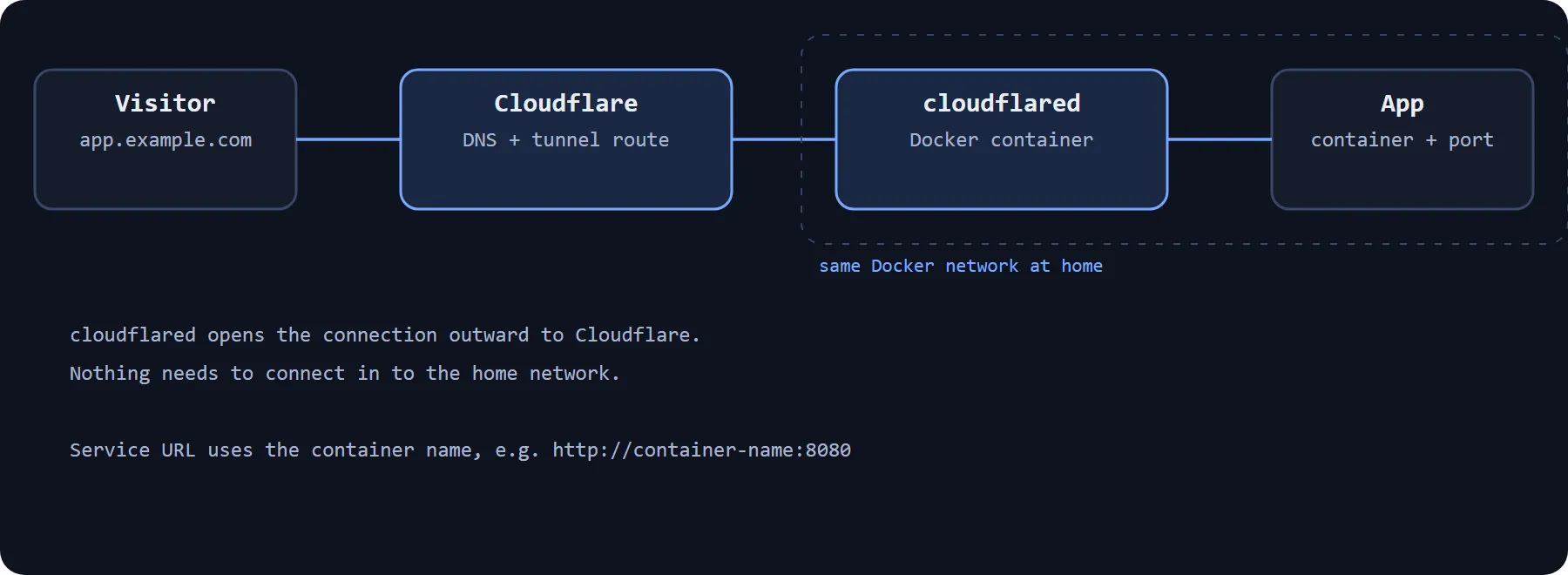
A Cloudflare Tunnel avoids that. A small program called cloudflared runs on your side and makes an outbound connection to Cloudflare. Cloudflare then passes visitors' requests through that connection to your app. Nothing needs to connect in to your network.
Requirements
- A domain added to Cloudflare
- A Cloudflare account
- A machine that can run Docker
- An app running in a container
How it works
Three pieces matter. The tunnel is created in your Cloudflare account. The cloudflared container runs at home and connects to it using a token. A published application route tells the tunnel which hostname goes to which service.
Step by step
- In the Cloudflare dashboard, go to Networking, then Tunnels, and select Create a tunnel. Give it a name.
- Choose Docker as the environment and copy the token from the command shown. Do not share it. Anyone with the token can run your tunnel.
- Run cloudflared as a container using that token. In my case this is a container on my Unraid server.
- On the tunnel's Routes tab, select Add route, then Published application.
- Enter a subdomain and pick your domain.
- In Service URL, enter the address of your app, for example
http://container-name:8080. Save.
The command Cloudflare shows takes this general form:
docker run cloudflare/cloudflared:latest tunnel --no-autoupdate run --token <YOUR_TUNNEL_TOKEN>Connecting to your apps
I run cloudflared as a Docker container connected to the same Docker network as my apps. That lets me use a container name in the Service URL instead of an IP address. If cloudflared and your app are on different Docker networks, the name will not resolve, so check that first when something fails.
Troubleshooting
- Tunnel shows as down: check the container is running and that the token is correct.
- 502 or similar error: the tunnel is working but cannot reach your app. Check the service URL, the port and the Docker network.
- Network restrictions: if the machine sits behind a restrictive firewall, check that it can reach Cloudflare on port 7844.
Results
I use this for a handful of small tools: domain tools, a change detector, PriceBuddy, n8n and TREK. I can reach them from outside the house.
Limitations
A tunnel makes your app reachable. It does not decide who is allowed to use it. Each of my apps uses its own login, and I do not currently use Cloudflare Access on top. Cloudflare Access would add a second layer in front of the app and is worth considering for anything sensitive.
The official Cloudflare documentation covers the steps in more depth and is the better reference if the dashboard changes.
Comments