- Docker
- Homelab
- Proxmox
- Self-hosted
- Unraid
My Homelab
It started as a way to host game servers without leaving my main PC on all day. It now runs my self-hosted apps, media, automation and a fair bit of experimenting.
What it is
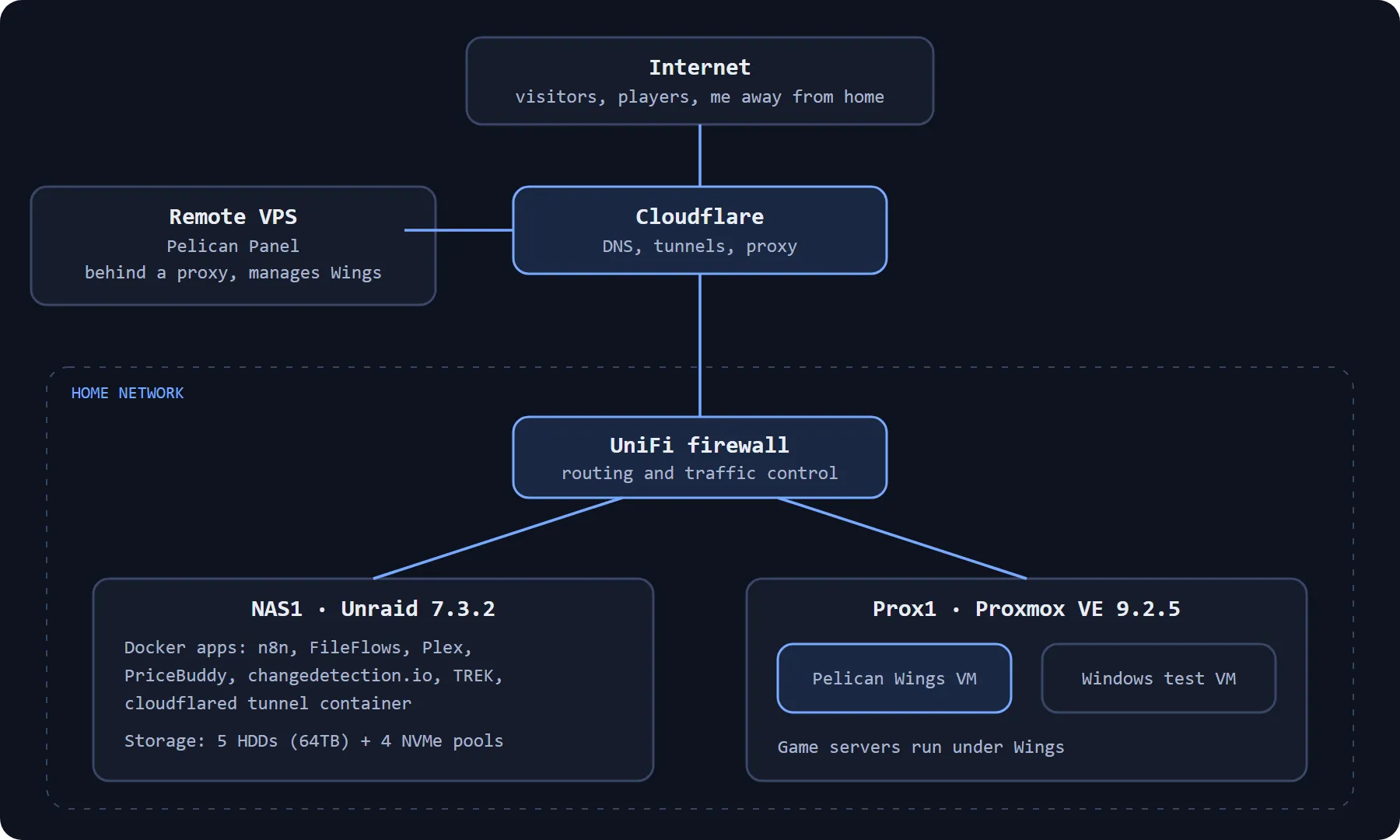
My homelab is two physical servers at home, plus a VPS that sits outside my home network. One server handles storage and Docker applications. The other runs virtual machines, including the one that hosts game servers.
Why I started it
I wanted somewhere to run multiplayer game servers and open-source applications without loading up my main workstation. It needed to stay on all the time and have enough storage for media, files and content creation. Over time it picked up more jobs: self-hosted tools, automation and a place to try software I was curious about.
The two servers
NAS1 runs Unraid 7.3.2 on an Intel Core i7-12700K with 64 GiB of DDR4 on an MSI PRO Z790-P WIFI DDR4 board. An NVIDIA RTX 2070 SUPER handles media transcoding and some light AI work. Storage is five hard drives making up 64TB, plus four NVMe pools for app data, cache, downloads and miscellaneous files and models.
Prox1 runs Proxmox VE 9.2.5 on an Intel Core i7-11700K with roughly 64 GiB of RAM (8 cores, 16 threads). One virtual machine runs Pelican Wings for game hosting. Another is a Windows machine for software that only runs on Windows, where I can trial things in a contained space.
The VPS runs Pelican Panel behind a proxy. Keeping it off my home network means the management side of game hosting is separate from everything at home.
What runs on it
- Plex for media streaming
- Pelican Panel and Pelican Wings for game servers, which was one of the original reasons for building all this
- n8n for automation
- FileFlows for compressing and transcoding media
- PriceBuddy, changedetection.io, DomainLocker and TREK for watching prices, web pages and domains and for planning trips
- Bambuddy for managing my 3D printers and filament
- PostgreSQL and MariaDB for web applications and development projects
Networking and remote access
Remote access uses a Cloudflare Tunnel running as a Docker container, alongside VPN connections and UniFi firewalls. I keep addressing, hostnames and firewall rules private.
Challenges and lessons learned
The thing that frustrates me most is a script or application that fails with a vague error or none at all. I end up adding logging, rewriting scripts or coming at the problem from a different angle until I can see what is going wrong. That is a big part of why I like self-hosting: I learn how things behave instead of only getting them running.
What is next
- Faster wired speeds inside the network
- Better Wi-Fi performance
- Looking into 10Gb networking
- Possibly fibre links between network nodes
- A half-rack or portable rack table, since the servers currently sit in a spare corner
Time, and the usage limits on the AI coding tools I use, set the pace on some of this.
Comments